Movicon Help on Line - Rel. 11.7.1302
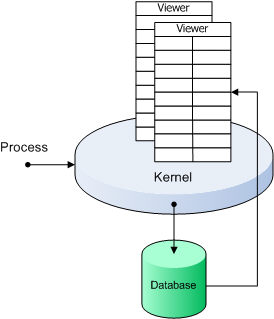
The Database file containing Log information will be created by Movicon automatically in the project's 'LOGS' folder. Based on the file type chosen, the data available will be as indicated below.
In any case, the Log display windows access the files to show logged events on screen, independently from the type of file being used.
ODBC
Normally, in the Windows 32/64 bit environment, the use of logs based on Relational DB offers many advantages in terms of managing files, openness, analysis and statistics. Movicon, if not specified otherwise, will use the ODBC links for managing Log files on Windows 32/64 bit systems.
The Log file names, if not specified otherwise, will be "ProjectName_hisLog" in the project's "LOGS" folder. However, you can customize the file name and the ODBC links through the "Project Historical Log Settings" properties. Three different tables will then be created in the Database, each one will contain the data relating to a certain type of event.
|
|
Movicon, if not specified otherwise, will use ODBC in Windows 32/64 bit environments. The format it will use is MsSQL Server or MsAccess as an alternative. When unable to create files and connections automatically, Movicon will alert with a message where you may then need to use the ODBC link manually of use the IMDB. |
IMDB
The log file management in IMDB (InMemory DB) is a valid alternative to Relational DB, which is ideal for embedded systems with limited recourses or based on Windows CE or Pocket PC.
The IMDB does not use ODBC and managed log files in text mode, by managing data in memory and unloading it on files at preset time interval. Filed data can be based on XML, on simple text or crypted.
The advantaged of using this management as an alternative to the potentialities used by the ODBC are:
Increased performances
Minimum resources required
Date base can be crypted against unauthorized access.
|
|
Movicon, if not specified differently, will use IMDB in WinCE environments. When the programmer is obliged to setup the ODBC management, Movicon will automatically to convert the project's ODBC links to ADOCE links in the device. This however, requires the implementation of the ADOCE components on the device. |
Data Tables
The Log file archive tables are:
Alarms: contains the project's alarm messages
Drivers: contains messages coming from the project's Communication Drivers
SysMsgs: contains the project's system messages
Each one of these tables has the following structure:
Time Column (TimeCol): reports the date and time of the recording in GMT (Greenwich Mean Time)
Local Time Column (LocalCol): reports the date and time of the recording in local time
MSec Column (MSecCol): reports the milliseconds relating to the time of the recording
User Column (UserCol): the name of the user logged in the project will be recorded in this field only if the recorded event was prompted by that user (e.g. by a button, etc.)
Event Column (EventCol): reports the event type recorded (E.g. Alarm ON, Alarm OFF, System, etc)
Event Number Column (EvNumCol): reports an ID number of the event recorded
Event Description Column (EvDescCol): reports the event description
Description Column (DescCol): reports information about the event type
Comment Column (CommCol): reports information about the event type
Duration Column (DurCol): reports the duration time of the event in question
Unique ID Column (UniID): reports the alarm's unique ID (value valid for the "Alarms" table only)
Transaction ID Column (TraID): reports the alarm's transaction ID (value valid for the "Alarms" table only)
|
|
The active user name is recorded in the Table's User column only when the event recorded was prompted by that user. For instance in the Alarms Table, the active user will only be recorded for the "Alarm ACK" and Alarm RESET" events but not for the "Alarm ON" and "Alarm OFF" events. |
However the names of the database columns can be customized through the "Project Historical Log Settings".
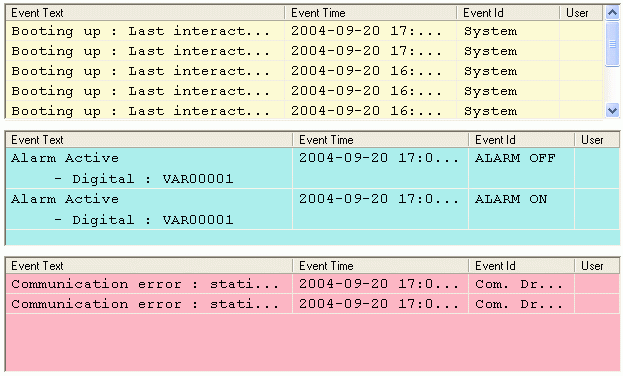
An Example of a Log Window containing data taken from the three log tables.