Movicon Help on Line - Rel. 11.7.1302
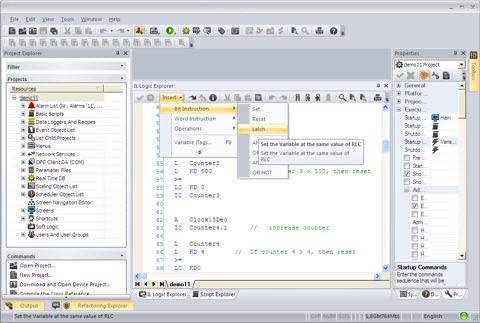
Inserting instructions which form the Movicon IL Logic Resource is done by using the appropriated editing window called "Logic Explorer", which is accessed from the 'View Menu'.
The "Logic Explorer", illustrated below, allows you to type the instructions and the variables which form the IL Logic program as a normal text editor, permitting the use of graphic formatting to make the program easier to understand.
The Movicon Logic Editor should be used as a normal Windows standard text editor. The programmer, while inserting the program, should naturally respect the programming syntaxes when entering logic instruction for variable combinations.
|
|
The programming has been made easier by the possibility to insert all the instruction by using the appropriated commands from the Insert Menu found in the 'Logic Explorer' window. This makes editing easier for the not-so-expert programmer by guiding them through the necessary procedures. |
Any syntax errors made during programming unguided by the Insert Menu will be indicated and highlighted in the compilation phase. However, you can use the 'Compile-Check Syntax' command which is available from the 'Logic Explorer' window to check to see if there are any errors.
The opening of the Logic window determines the displaying of the empty editing area with the cursor positioned at the top left. You can then proceed with writing the logic program by respecting the Movicon Editor's programming syntaxes.
Program editing works with the ordinary procedures of a normal text editor, apart from the fact that the programming syntaxes are automatically acknowledged and represented with default colors.
|
|
You are unlimited with the number of comment texts that can be written as long as they are preceded at the beginning of the line with the '//' character. |
|
|
Access to the variables is only permitted by using the Variable's name. You cannot access to variables through their absolute addresses (even when the variables are mapped in the Input, Output and Flag shared areas). |
The IL logic instructions have also been adapted to the AWL syntax of the Step7. Therefore some instructions may be written in three different syntaxes: Movicon standard syntax, English Step7 syntax, German Step7 syntax. You can use on of these three syntaxes in mixed mode in the same listed IL logic. For further information on the instruction please consult the relevant tables.
Unsupported Variables
Some variable types cannot be used in the Movicon IL Logic especially those listed below:
Double Variables (64 bit double precision): these variables cannot be used in as the ACCU1 and ACCU2 registered in 32 bit
String and Byte Array type variables: these variables cannot be used as their format is not supported in IL Logic
Variable Access
You can address variables in the IL Logic which have been declared in a different hierarchical level in respect to that of the object in which the logic has been inserted, such a Father or Child project RealTimeDB Variables with the same Local screen variable name. You can use the '..\<VariableName>' and '<ChildProjectName>\<VariableName>' suffixes tor indicate the variables. When the name of the variable is indicated only, a search is made for the context in which the logic is executed.