Movicon Help on Line - Rel. 11.5.1183
The Movicon Licenses are based on both the options to be used and the number of I/O bytes needed.
The byte count for sizing the license is only executed for those variables used in the following resources:
SERVER Runtime License |
|
CLIENT Runtime License |
|
The byte count, for sizing the license, is done only for variables which are InUse. For instance, a variable linked to the field, through a Movicon Communication Driver, is only counted when it goes in use, such as when a screen is displayed.
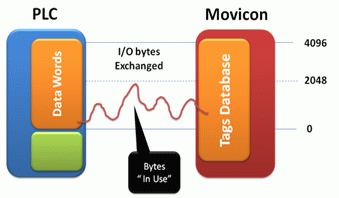
This chart shows a project connecting 4096 I/O bytes simultaneously, but only 2048 of them actually go into use and not more. Therefore a license with 2048 I/O bytes is needed.
In addition, take into account that the variables exchanged with one single Communication Driver task will be counted for license purposes only if they are in use in the project. For instance, if a communication task exchanges a packet of 10 byte variables, and one of these go into use in the project, the task will be activated and the variable packet exchanged, however only one byte will be counted by the license as only one variable went into use.
|
CAUTION! Variables defined in the "Flag" shared area can also be exchanged with the field and therefore are subjected to the same license byte count rules which stand for all variable types. |
|
In cases when networking between a Server and Client application, the moment in which Structure or Array type variables re exchanged, the use of bytes on the Client side is calculated by counting the bytes of each individual structure member or array element exchanged with the Server. However, on the Server side, all of the Structure or Array variable is put into use, therefore the byte count is based on the total number of bytes of all structure members or Array elements. |
Furthermore, it is important to consider that some project resources keep in use their associated variables and therefore will be counted for the license when exchanged with the field at the project startup and stop. These resources are:
Alarms
DataLoggers and Recipes
Event Objects
Scaling Objects
Scheduler Objects
IL Logic associated to project
Basic Script: the Basic Script resources put in use those variables to be used at the first script's execution, but kept in use after the code execution has terminated. The scripts variables only go to being NOT in use when the command to unload script from memory is executed. However, this only happens when the Basic Script is set in a "Separate Thread" otherwise its variables will remain in use

Programmer Guide Appendix