Communication Drivers
The Supervisor installation provides the automatic installation of the available drivers library together with the platform.
The Supervisor Drivers, being built as simple .DLL files, can be easily enlarged or updated independently from the development platform. To update or install a new driver, simply copy the relevant .DLL file to the Drivers folder, which is found inside the Supervisor installation folder (I.e. C:\Program Files\Progea\Movicon11.3\Drivers).
Project designers can choose which communication driver to insert and configure in their various applications simply by selecting it from the list provided.
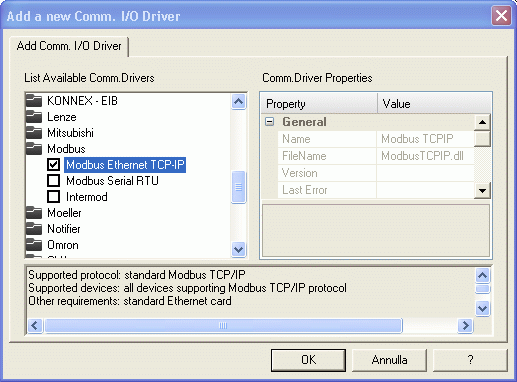
The insertion and setting up of a communication driver is done in Supervisor programming mode, through the 'Comm. Drivers List' resource from the 'Real Time DB' group in the 'Project Explorer' window. When activating the 'Add new Comm. Driver' command a dialog window will displaycontaining a list of the drivers available.
The botton window shows important data linked to the selected communication driver:
Brief protocol description
List of supported devices
Cards or libraries needed
Any driver restrictions: areas not supported, connections with more than one PLC not possible, etc.
Once the driver has been inserted, it can be configured through the Supervisor 'Properties Window'.
More than one communication driver can be inserted in a single project as long as they comply with the options set on the hardware key.
A new item called the ""Renaming Manager" has been added to the Communication Drivers list of features which allows you to know whether or not the driver supports the renaming management. Those drivers that support this management, option set to 'true', consent variables to be displayed with names changed within their configuration window and also support the apply new name command.

