Variable List (Tags)
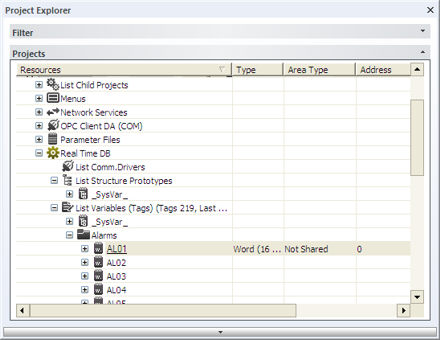
The 'Variable List (Tags)' resource is used for declaring which variables are to be used within projects for the logical, for the Resources, Controls, Communication drivers etc. Each variable must have a unique name within the 'Variable List (Tags)' resource, which will be recognized within the project by its symbolic name. When using Movicon "Shared" data areas to generate variables, these will also have an absolute address, but the variables' symbolic names will always refer to the project's internal. The absolute address can be changed after without jeopardizing the variables correct identification in points of the project where they are being used.
The Movicon 'Variables List (Tags)' are 'smart' types, which means Alarms, Data Loggers or Recipes can be associated to single variables. In addition to this each variable can be enabled with the Tracer, OPC, Networking, Scaling functions etc., through the 'Property Windows'.
|

|
Using the 'Variables list' will not effect system's performance, as links to variables take place all at once during the startup of the project's runtime. This technology does not sacrifice feedback times even when extended databases with thousands of variables are being managed.
|
The advantages offered by using the 'Variables List (Tags)' are:
-
reduction in typing or addressing errors in logic programming
-
reduction in program editing time of varied logic addresses when using Movicon "Shared" data areas. Not necessary to modify project when changing absolute addresses of variables
-
direct association of events to variables of the Realtime DB such as Alarms, Data Loggers and Recipes
-
direct reading/writing of remote data on network Servers with Networking functionalities using TCP/IP standard protocol
-
direct reading/writing of data on Database files using ODBC
-
OPC Client application information availability due to the OPC Server function integrated in Variables' properties
-
variable Tracer option settings
-
Scaling option settings of the data associated to the variable
|

|
Positioning the cursor on the Variable list and digiting in a keyboard key, Movicon will search and move the cursor to the first variable that starts with that digited key. This search only works if the listed variables shown in the window are not more than 3000. For example, if variables have been divided into groups and only some of these groups have been expanded only the ones in the exploded groups should not exceed the limit of 3000.
|
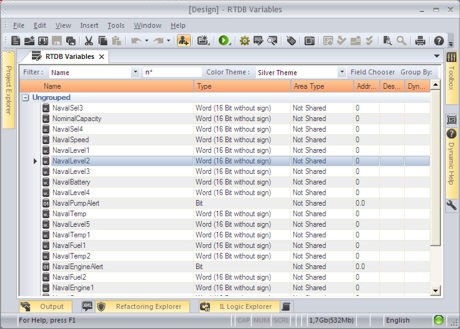
To get a clearer and more readable display of the Variable list, defined in the project's Real Time DB, you can use the "List Variables" window which can be easily opened by double clicking on the "List Variable(Tags)" resource.
|
|
You can create Local Variables inside a Screen resource which are created and destroyed together with the Screen and which can be used only within the context of the Screen.
|