What are the "Data Logger and Recipes (ODBC) Settings" and how can they be used in a new project?
The "Data Logger and Recipes (ODBC) Settings" allow defining whether to add certain DataLoggers as Templates to the project during its creation. This facilitates setting specific recording times for Data Loggers, making it easier to directly associate them with variables from the Movicon Real Time DB.
How can variables be associated with the Data Logger?
Variables can be associated with the Data Logger by following the instructions provided in the "Associating Data Loggers and Recipes with a Variable" section. This allows recording different variables with the same recording modes, making the assignment of variables to the Data Logger more efficient
Is it possible to make changes to the Data Logger settings after its creation?
Yes, it is possible to make changes to the Data Logger settings, including the recording time. However, such changes must be made manually by the programmer. It is also possible to add columns to the Data Logger or use them in their standard operation rather than as Templates.
What does Movicon maintain internally regarding project revisions, and where is this information stored?
Movicon maintains an internal revision (build) counter of
the project, which it saves in the
Where are the backup files stored, and what format are they in?
The folder containing the project also contains all backup files from the saves. These backups are stored in ".zip" format to conserve disk space. Additionally, the zip files contain files with relative paths for easy extraction.
What happens if you select the "Basic" option for the license type during project development?
If you select the "Basic" option, the system will hide or disable all functionalities not supported by Power HMI in the editor, preventing the programmer from inadvertently inserting them.
How does the selection of the license type during development affect the functionalities available during project execution?
Regardless of the selection made during development, during project execution, the functionalities of Movicon or Power HMI will be enabled exclusively based on the installed license. A Movicon project developed with a Standard license but executed on a machine with a Basic license will be subject to the limitations of Power HMI.
What is the addressing capacity of variables in Movicon?
Movicon can address variables in memory areas up to 4 gigabytes, according to Windows limits. This translates to over 4 billion bytes for each type of variable. Variables can be defined in the "Shared" or "Non-Shared" area of Movicon, and the quantity of variables exchanged with the field depends on the number of "Tags" enabled by the system protection key, based on the purchased version.
What is the limit of usage for dynamic variables in a Movicon project?
The number of dynamic variables used must always be compatible with the number of "tags" provided by the Movicon license used. However, upon opening a resource, Movicon automatically allocates these variables in memory, theoretically allowing for an unlimited number of dynamic variables within a project.
What is meant by remote Networking connection in Movicon?
Remote Networking connection refers to the dynamic connection between variables contained in the Real Time DB of two or more Movicon stations, allowing for data exchange between projects.
What format is used for Movicon's Objects and Controls?
Movicon's Objects and Controls are created in a proprietary vector format, allowing for the creation of symbols composed of multiple components and the association of animation properties with symbols. This format can be exported to or imported from the Metafile format (WMF, EMF).
Does Movicon support Windows Terminal Server (or Remote Desktop)?
Yes, Movicon supports Windows Terminal Server (or Remote Desktop), enabling the execution of multiple "instances" of the program on the server.
Can I use a Hardware USB license with a virtual machine?
Depending on the virtual machine used, Hardware USB license keys may not be compatible with Movicon. Therefore, it is recommended to use software license keys to ensure compatibility. It is important to specify during ordering if the license will be installed on a Virtual Machine.
What is the difference between Movicon and Movicon Power HMI?
Movicon Power HMI is a more limited version of Movicon, with some features reduced or disabled compared to the standard version of Movicon.
What types of licenses are available for Movicon Power HMI?
Licenses for Movicon Power HMI are exclusively of the software type and are generated based on the MAC Address of the device's network card.
How is the byte count managed for Array variables when exchanged with a field (Driver, OPC)?
When an Array variable is exchanged with a field (Driver, OPC), the byte count used for the license is managed only for the elements actually used in the project. In other words, only the elements of the Array that are actually in use are counted in the byte consumption calculation for the license.
How is the byte consumption calculated on the Client side in case of Networking for Array variables?
In case of Networking, the byte consumption on the Client side is calculated by considering the bytes of the individual elements exchanged with the Server. Therefore, the byte count on the Client side is based on the sum of the bytes of the individual elements of the Array exchanged with the Server.
How is the byte count managed on the Server side for Array variables in case of Networking?
On the Server, the entire Array variable is used, so the byte count is based on the sum of the bytes of all elements of the Array, regardless of how many of them are actually exchanged with the Client.
Is a separate license required to use the Report Designer in Movicon?
No, a separate license is not required to use the Report Designer in Movicon. The Report Designer libraries are integrated and distributed with Movicon completely free of charge. No license activation is required to use this tool.
Why might WinCE not handle milliseconds in recordings?
In Movicon's WinCE runtime, the functions "GetSystemTime" and "GetLocalTime" are used to retrieve date information for recording purposes. However, the 'wMilliseconds' field of the structure returned by these calls might not be handled on all WinCE devices. Consequently, on some devices, achieving millisecond resolution in recordings may not be possible.
What happens after the memory limits are reached in the IMDB?
When Movicon's IMDB reaches the limits of local or shared memory, errors may appear in the application log such as "IMDB - Internal error: Out of shared memory" or "IMDB - Internal error: Out of local memory." Following these errors, all tables registered on the IMDB become inaccessible for both writing and reading. Attempting to access the locked tables will result in the error "IMDB - Info: Query timed out due to a write-locked table.
Why can't I change pages in the "SynopticLoading" event?
Since build 957 of Movicon, the code handling page changes has been strengthened. As a result of these changes, it's no longer possible to open a synoptic while another synoptic is still being opened, for example using VBA code in the "SynopticLoading" event of a synoptic.


Why can't I browse a project on PocketPC?
On PocketPC devices with Windows Mobile 5.0, browsing folders and files with a 6-character extension (e.g., .movprj) using the project selection window that appears after launching Movicon is not possible. This limitation is due to restrictions imposed by Microsoft on user access to folders and files. Therefore, it's recommended to use the boot file to automatically start a project upon Movicon launch and to use project start/stop commands in the upload window during development.
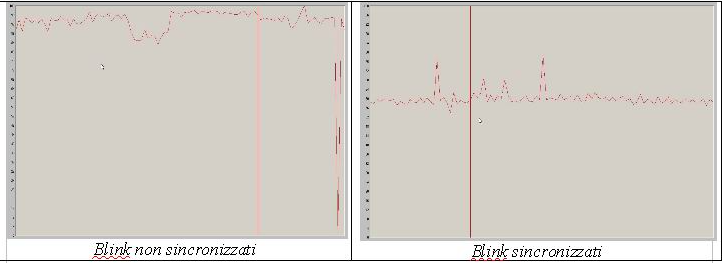
What does synchronization of Blink-type animations in the synoptic mean?
Synchronization of Blink-type animations in the synoptic means that all objects with the same blink time will change their text or background color at the same time. This modification was implemented to reduce CPU stress when multiple blinking objects are present in the synoptic. Synchronization optimizes CPU usage, as evidenced by the comparison of CPU load graphs with and without synchronization. It's important to note that the maximum number of synchronized objects in the blink is limited by the values of the general synoptic settings for medium, fast, and slow blink times.
Why doesn't my runtime user use the properties of its runtime group?
For runtime users already defined in a project, it's not
possible to change their group membership at runtime.
If the runtime user in the file
What is the HisLogUpdate.exe file and how does it work?
The HisLogUpdate.exe file was introduced in version 11.0
of Movicon and is used to modify the structure of historical
log tables (Alarms, Drivers, and SysMsgs) when a project is
executed. This prevents any historical data loss when transitioning
from a previous version of the software to version 11.0.
Here's how it works:
- Movicon, during project execution, checks if there
is a file named "
.hisupg" in the project folder. - If the file exists, Movicon does not call the HisLogUpdate.exe tool.
- Otherwise, Movicon calls the HisLogUpdate.exe tool, passing it the project's path and name.
- The tool reads all information related to any column or table name customizations from the project and updates the database structure by adding any missing columns.
- If the tool successfully updates the historical log
tables, it creates a file named "
.hisupg" in the project folder.
How can I manually install Windows certificates?
In certain situations, such as in installations without
an Internet connection, it may be impossible to automatically
update Windows certificates using the Windows Update procedure.
However, the issue can still be resolved by manually installing
the certificates.
Here's how you can generate and install the certificates manually:
- From the Control Panel or Internet Explorer (under Tools) on the source PC, select "Internet Options" > "Content" > "Certificates" and "Trusted Root Certification Authorities."
- Export the desired certificates, such as "Verisign Class3 - G5 or G2."
- Subsequently, on the target PC, again under "Internet Options," import the list of previously exported certificates.
What changed with licensing in Movicon 11.7?
The old CrypKey system is gone. Movicon 11.7 now has its
own Soft Key licensing, tied to your hardware.
That means licenses can’t just be copied over to another machine—you
have to deactivate and reactivate them properly.
If you’re using a Movicon 11.6 USB dongle, it still works,
but it needs an update.
There’s also a Network License option that lets multiple machines
share one license.
What’s the deal with security in Movicon 11.7?
Movicon 11.7 is improved in security. It logs every failed
login attempt instead of just the last one.
If someone keeps trying to log in, the system can lock their
account automatically.
It also tracks every change in user permissions so admins know
exactly who did what and when.
And if you’re in a highly regulated industry, electronic signatures
are now required for critical actions.
What about access control in Movicon 11.7?
There’s a new feature called Level Segregation.
Before, users with higher access levels could perform lower-level
tasks too.
Now, you can set it so that each user only has access to the
exact tasks assigned to them—no more, no less.
Can Movicon 11.7 run in a virtualized environment?
Yes! It fully supports VMware and Windows Virtual PC, so
you can run it in a virtual machine without any issues.
It also works fine with Network Licensing inside a virtual
setup.
How does Movicon 11.7 handle user authentication?
Failed login attempts are logged, and you can set a lockout
threshold after too many tries.
There’s also password history enforcement, so users can’t reuse
the same old passwords.
Can I still use my Movicon 11.6 projects in Movicon 11.7?
Yes, Movicon 11.7 is backward compatible with 11.6 projects.
But if your project relied on old CrypKey-based licenses, you’ll
need to migrate to the new system first.
How does the soft key work in Movicon 11.7?
The soft key is hardware-bound, meaning it is linked to
the specific machine it was activated on.
It is stored in: C:\ProgramData\Progea\Movicon11\Mov11.movTrack
If you need to transfer the soft key to another PC, it must
first be deactivated on the current machine before being reactivated
on the new one.
Can a Movicon 11.6 license be upgraded to Movicon 11.7?
Yes! Customers upgrading from Movicon 11.6 to 11.7 must
also update their soft key or USB dongle to ensure compatibility.
For further details on the upgrade process, please contact
your regional Emerson representative.
Do I need to generate activation codes for special drivers in Movicon 11.7?
No. All drivers that required activation codes in Movicon
11.6 are now included by default with the Movicon 11.7 runtime
license.
This means there is no need to quote or process separate activation
codes anymore.
However, Movicon 11.6 users must still purchase activation
codes separately as before.